
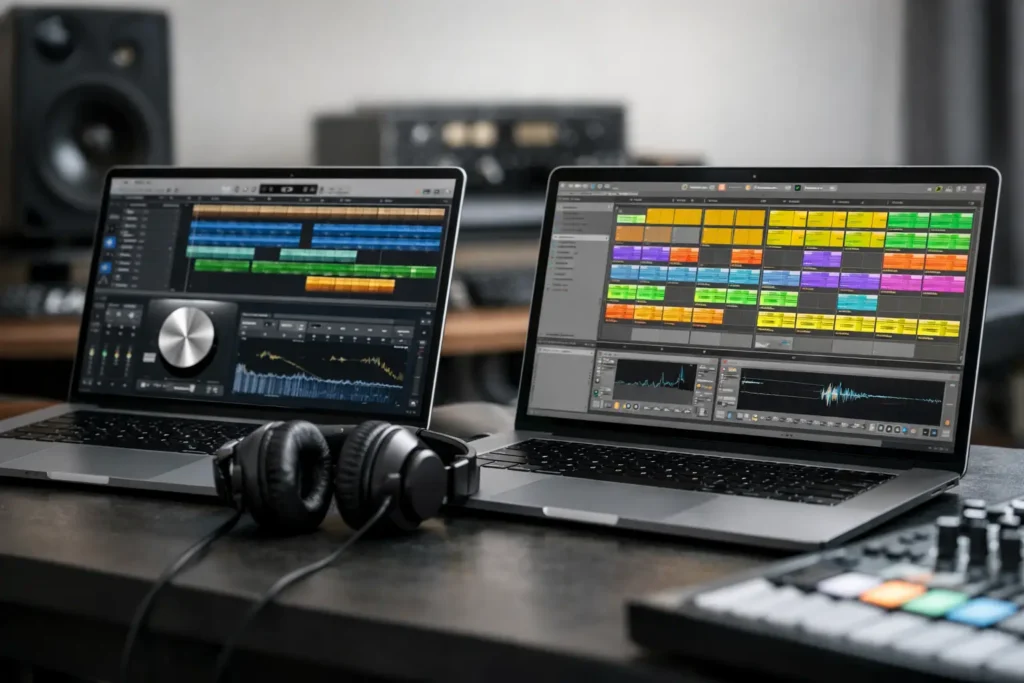
A great chorus can lose its momentum fast when you are fighting the software instead of capturing the idea. Logic Pro versus Ableton Live is not a contest with one universal winner. It is a workflow decision. The right DAW is the one that gets your songs recorded, arranged, mixed, and finished without forcing you to work against your own creative habits.
Logic Pro is built around the traditional studio model: tracks, takes, comping, editing, arranging, mixing, and delivering polished records. Ableton Live is built around flexible musical construction: clips, loops, MIDI, sound design, performance, and fast experimentation. Both can produce commercial releases. The question is what happens during the hours between opening a session and bouncing the final mix.
Logic Pro versus Ableton Live: The Core Difference
Logic Pro feels familiar to anyone who has worked in a recording studio or used a conventional multitrack DAW. You create tracks, record complete passes, edit regions along a timeline, build an arrangement, then move into mixing. Its main workspace, the Tracks area, encourages linear songwriting. Verse, chorus, bridge, outro – it is all visible from left to right.
Ableton Live gives you that linear Arrangement View too, but its Session View changes the conversation. Instead of committing immediately to a timeline, you can launch audio or MIDI clips in any combination. A drum loop can keep running while you try three bass ideas, swap synth parts, trigger vocal chops, and test transitions without stopping playback. For electronic production, beat-making, live performance, or songwriting built from loops, that freedom can be hard to give up.
Neither approach is inherently more professional. A singer-songwriter tracking full vocals and guitars may find Ableton’s clip grid unnecessary. A producer building house, hip-hop, ambient, or experimental music may find Logic’s timeline-first approach slower at the idea stage. Your preferred starting point matters more than a feature checklist.
Choose Logic Pro If Recording Is Central to Your Work
Logic Pro is an exceptionally strong choice for Mac-based artists who record vocals, guitars, keyboards, drums, or full bands. Its comping workflow makes it easy to record multiple takes and assemble the best performance. Recording a lead vocal should not require a complicated workaround, and Logic handles the practical work well: punch-ins, take folders, editing, tuning, routing, buses, aux effects, and detailed automation.
The included sound library is also a real advantage. Logic ships with serious instruments, sampled sounds, drum tools, effects, loops, and production utilities. For a songwriter or home studio owner who needs a capable setup without immediately buying a stack of third-party plug-ins, that value is significant. Drummer can quickly create usable rhythm tracks, while the built-in instruments cover a lot of ground for demos and finished production.
Logic’s mixer is another reason engineers often feel at home in it. Channel strips, sends, inserts, groups, VCAs, automation, and track stacks are organized in ways that translate well to conventional mixing practice. If you think in terms of a console and a signal path, Logic usually makes sense quickly.
There is one major limitation: Logic Pro is Mac-only. If you use Windows now, or need to move sessions between a Mac and Windows machine without changing DAWs, Logic is off the table. Do not buy a computer solely because someone online said Logic is the “pro” choice. Buy into a platform only when it supports the rest of your hardware, budget, and long-term workflow.
Choose Ableton Live If You Build Music in Loops and Variations
Ableton Live is often the faster choice when your songs begin with drums, samples, MIDI patterns, and sound design. Session View lets you keep several musical possibilities alive at once. You can make five drum patterns, three chord progressions, and several bass variations, then audition combinations in real time. That is more than a convenient feature. It changes how you write.
Ableton is also a natural fit for artists who want to perform their material live. Clips can be launched manually, arranged into scenes, processed with effects, and manipulated with controllers. If your studio set is also your stage set, Live was designed with that overlap in mind.
Its warping tools are a major strength. Ableton makes it easy to match the timing of samples, acapellas, field recordings, and loops to a project tempo. Producers working with sampled material will appreciate how quickly they can stretch, slice, reverse, resample, and reshape audio. Max for Live, included with the Suite edition, extends that flexibility with devices and tools made by Ableton and its user community.
The trade-off is that Ableton can feel less immediate for a traditional tracking-and-mixing session, especially for users coming from Pro Tools, Logic, or a hardware-console background. It absolutely records vocals and instruments well, but some producers find its editing and comping approach less comfortable when a project involves many complete takes, detailed vocal production, and dense multitrack sessions.
Sound Quality Is Not the Deciding Factor
Both DAWs are capable of professional sound quality. If a mix is weak, the cause is almost never that Logic or Ableton has inferior audio fidelity. More often, the issue is arrangement, source recording, monitoring, gain staging, editing, processing choices, or mix decisions.
Both programs support professional plug-in formats, automation, high-resolution audio recording, routing, and export options. The better sounding DAW is generally the one you understand well enough to make deliberate decisions in. A producer who knows Ableton’s racks, automation, and resampling deeply will get stronger results there than in Logic after a weekend of menu hunting. The reverse is equally true.
Cost, Versions, and the Hidden Price of Switching
Logic Pro has a straightforward purchase model and includes a large amount of content. For many Mac users, it is one of the strongest values in music software. Ableton Live is available in different editions, and the feature set matters. Intro is limited, Standard covers many production needs, and Suite includes the broadest collection of instruments, sounds, effects, and Max for Live.
Do not compare only the upfront price. Consider what you already own and how you work. If you have years of Logic templates, vocal chains, track stacks, and project archives, moving to Ableton has a cost in time. If you own an Ableton Push controller, depend on Session View, or perform with clips, moving to Logic may remove the very tools that make your process fast.
Also check plug-in compatibility before committing. Logic uses Audio Units, while Ableton supports VST3 and Audio Units on Mac, with VST3 support on Windows. Most major plug-in developers support the common formats, but older plug-ins and unusual utilities can create surprises. Your interface, MIDI controller, external synths, and monitoring setup should be part of the decision, not an afterthought.
A Practical Way to Decide
Start with the music you actually make, not the music you might make someday. If your next three projects involve recording vocals over acoustic instruments, editing takes, and mixing songs from start to finish, Logic Pro is likely the more natural home. If your next three projects involve building beats, manipulating samples, launching scenes, and creating arrangements from improvisation, Ableton Live may get you moving faster.
Then test the same small task in both programs. Build an eight-bar beat, record a vocal, edit a timing problem, automate a delay throw, arrange a chorus, and export a rough mix. Pay attention to where you hesitate. The DAW that makes you stop and search for basic actions may be the wrong fit – or it may simply be the one that needs focused instruction before you judge it.
That distinction matters. Many users abandon capable software because a single routing issue, controller setup problem, or confusing workflow breaks their momentum. A live one-on-one session with an experienced engineer can solve the exact problem in front of you far faster than sorting through unrelated tutorials. OBEDIA helps producers build workflows around their actual setup, whether that means tracking better vocals in Logic or making Ableton’s Session View work for a finished arrangement.
Do Not Pick a DAW to Impress Other Producers
Logic Pro is not only for singer-songwriters, and Ableton Live is not only for electronic musicians. Plenty of chart-ready tracks, film cues, indie records, hip-hop productions, and live sets are made in both. The software does not determine your taste, discipline, or ability to finish.
Pick the environment that keeps you creating when the first idea is exciting and keeps you organized when the project becomes real work. Once that choice is made, stop comparing screenshots, learn the tools that matter to your sessions, and put the energy back where it belongs: making the next track better than the last.